Introduction
In the world of AI-powered applications, three key concepts have become foundational for building intelligent search and question-answering systems: Embeddings, Vector Search, and Retrieval-Augmented Generation (RAG). This guide explores these concepts in depth and demonstrates how to implement them using Spring AI framework with real-world code examples.
Understanding Embeddings
What Are Embeddings?
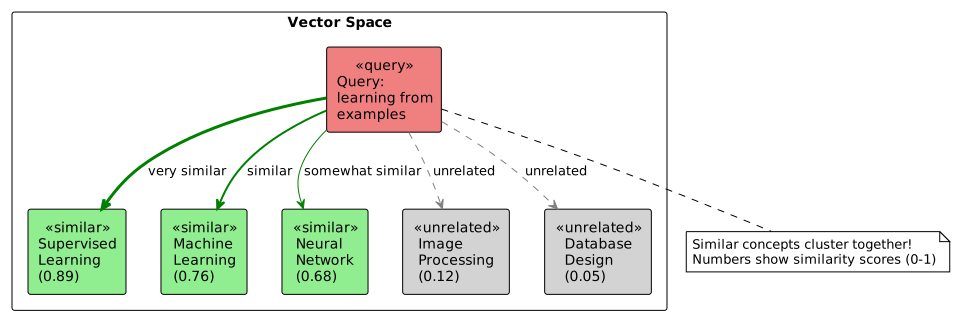
Embeddings are numerical representations of text (or other data) in high-dimensional space. Think of them as coordinates in a multi-dimensional map where semantically similar concepts are located near each other.
"machine learning"    → [0.023, -0.156, 0.089, ..., 0.234]  (1536 dimensions)
"artificial intelligence" → [0.019, -0.148, 0.095, ..., 0.221]
"cooking recipes"     → [-0.234, 0.456, -0.123, ..., 0.089]
Why Embeddings Matter
Traditional keyword search has limitations:
-
Exact match required: Searching "car" won’t find "automobile"
-
No context understanding: "apple" could mean fruit or company
-
Synonyms missed: "happy" won’t match "joyful"
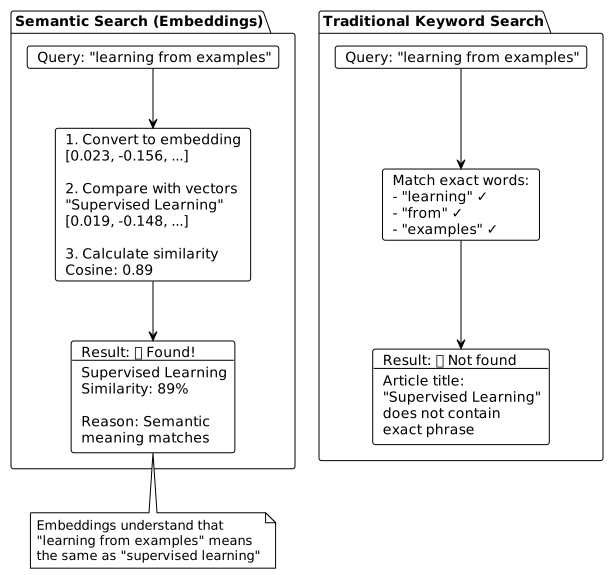
Embeddings solve these problems by capturing semantic meaning:
| Query | Traditional Search Result | Semantic Search Result |
|---|---|---|
"learning from examples" |
❌ No match |
✅ Finds "Supervised Learning" |
"understanding images" |
❌ Only exact matches |
✅ Finds "Computer Vision", "CNN" |
"game playing AI" |
❌ Limited matches |
✅ Finds "Reinforcement Learning" |
How Embedding Models Work
Embedding models are neural networks trained on massive text corpora to understand relationships between words and concepts.
Popular Embedding Models
| Model | Provider | Dimensions | Use Case |
|---|---|---|---|
text-embedding-3-small |
OpenAI |
1536 |
General purpose, cost-effective |
text-embedding-3-large |
OpenAI |
3072 |
Higher accuracy, more expensive |
nomic-embed-text |
Ollama (local) |
768 |
Privacy-focused, offline use |
all-MiniLM-L6-v2 |
HuggingFace |
384 |
Lightweight, fast |
Vector Space Visualization
Embeddings place semantically similar concepts near each other in high-dimensional space. Here’s a simplified 2D visualization:
Vector Similarity
Once text is converted to embeddings, we measure similarity using distance metrics:
Cosine Similarity
The most common metric for text embeddings:
Cosine Similarity = (A · B) / (||A|| × ||B||)

Where:
  A · B   = dot product of vectors
  ||A||   = magnitude of vector A
  ||B||   = magnitude of vector B

Result: Value between -1 and 1
  1   = identical direction (very similar)
  0   = orthogonal (unrelated)
-1 = opposite direction (opposite meaning)Vector Databases and PgVector
Why Vector Databases?
Traditional databases aren’t optimized for vector operations. Vector databases provide:
-
Efficient similarity search: Find nearest neighbors quickly
-
Indexing: Fast approximate search using algorithms like HNSW
-
Scalability: Handle millions of vectors
-
Filtering: Combine vector search with metadata filters
PgVector: Vector Extension for PostgreSQL
PgVector extends PostgreSQL with vector capabilities, offering:
-
SQL integration: Use familiar SQL with vector operations
-
ACID compliance: Transactions, consistency, durability
-
Rich ecosystem: Leverage existing PostgreSQL tools
-
Vector operators:
<⇒(cosine distance),<→(L2 distance)
Setting Up PgVector
-- Create database and enable extension
CREATE DATABASE myvectordb;
\c myvectordb
CREATE EXTENSION vector;
CREATE SCHEMA embeddings;

CREATE TABLE embeddings.vector_store (
    id UUID PRIMARY KEY,
    content TEXT,
    metadata JSONB,
    embedding VECTOR(1536)
);

-- Create HNSW index for fast similarity search
CREATE INDEX ON embeddings.vector_store
USING hnsw (embedding vector_cosine_ops);
Spring AI Configuration
# Database connection
spring.datasource.url=jdbc:postgresql://localhost:5432/myvectordb
spring.datasource.username=myuser
spring.datasource.password=mypassword

# PgVector configuration
spring.ai.vectorstore.pgvector.index-type=HNSW
spring.ai.vectorstore.pgvector.distance-type=COSINE_DISTANCE
spring.ai.vectorstore.pgvector.dimensions=1536

# OpenAI embeddings
spring.ai.openai.api-key=${OPENAI_API_KEY}
spring.ai.openai.embedding.options.model=text-embedding-3-smallBuilding Applications with Spring AI
Spring AI Architecture
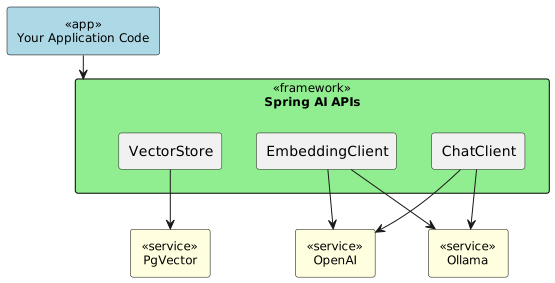
Spring AI provides a unified abstraction layer for working with various AI services:
Maven Dependencies
<properties>
    <java.version>21</java.version>
    <spring-ai.version>1.0.3</spring-ai.version>
</properties>

<dependencyManagement>
    <dependencies>
        <dependency>
            <groupId>org.springframework.ai</groupId>
            <artifactId>spring-ai-bom</artifactId>
            <version>${spring-ai.version}</version>
            <type>pom</type>
            <scope>import</scope>
        </dependency>
    </dependencies>
</dependencyManagement>

<dependencies>
    <!-- Spring AI OpenAI Integration -->
    <dependency>
        <groupId>org.springframework.ai</groupId>
        <artifactId>spring-ai-starter-model-openai</artifactId>
    </dependency>

    <!-- PgVector Store -->
    <dependency>
        <groupId>org.springframework.ai</groupId>
        <artifactId>spring-ai-starter-vector-store-pgvector</artifactId>
    </dependency>

    <!-- PostgreSQL Driver -->
    <dependency>
        <groupId>org.postgresql</groupId>
        <artifactId>postgresql</artifactId>
    </dependency>

    <!-- PgVector JDBC Extension -->
    <dependency>
        <groupId>com.pgvector</groupId>
        <artifactId>pgvector</artifactId>
        <version>0.1.6</version>
    </dependency>
</dependencies>
Implementing Semantic Search
Let’s build a complete semantic search service using Spring AI.
The EmbeddingService Class
@Service
public class EmbeddingService {

    private static final Logger logger = LoggerFactory.getLogger(EmbeddingService.class);
    private final VectorStore vectorStore;

    public EmbeddingService(VectorStore vectorStore) {
        this.vectorStore = vectorStore;
    }

    /**
     * Store an article with its embedding
     * Spring AI automatically generates the embedding via OpenAI
     */
    public void storeArticle(Article article) {
        // Prepare metadata
        Map<String, Object> metadata = new HashMap<>();
        metadata.put("title", article.getTitle());
        metadata.put("category", article.getCategory());
        metadata.put("url", article.getUrl());

        // Truncate content if needed (OpenAI has 8191 token limit)
        String content = article.getContent();
        if (content.length() > 8000) {
            content = content.substring(0, 8000);
        }

        // Create document - Spring AI handles embedding generation
        Document document = new Document(article.getId(), content, metadata);

        // Store in vector database
        vectorStore.add(List.of(document));
        logger.info("Stored article: {}", article.getTitle());
    }

    /**
     * Perform semantic search
     * Returns articles ranked by similarity to the query
     */
    public SearchResult semanticSearch(String query, int topK) {
        long startTime = System.currentTimeMillis();

        // Build search request
        SearchRequest searchRequest = SearchRequest.builder()
            .query(query)           // User's search query
            .topK(topK)             // Number of results to return
            .build();

        // Execute similarity search
        // Spring AI:
        //   1. Generates embedding for query via OpenAI
        //   2. Executes vector similarity search in PgVector
        //   3. Returns ranked results
        List<Document> documents = vectorStore.similaritySearch(searchRequest);

        // Convert to domain objects
        List<Article> results = documents.stream()
            .map(this::documentToArticle)
            .collect(Collectors.toList());

        long executionTime = System.currentTimeMillis() - startTime;

        logger.info("Search for '{}' found {} results in {}ms",
                    query, results.size(), executionTime);

        return new SearchResult(query, results, executionTime);
    }

    /**
     * Search with metadata filtering
     * Example: Find articles in "AI" category similar to query
     */
    public SearchResult searchWithFilter(String query, String category, int topK) {
        SearchRequest.Builder builder = SearchRequest.builder()
            .query(query)
            .topK(topK);

        // Add metadata filter
        if (category != null) {
            String filter = String.format("category == '%s'", category);
            builder.filterExpression(filter);
        }

        List<Document> documents = vectorStore.similaritySearch(builder.build());
        List<Article> results = documents.stream()
            .map(this::documentToArticle)
            .collect(Collectors.toList());

        return new SearchResult(query, results, 0);
    }

    /**
     * Find similar articles to a given article
     * Uses the article's content as the query
     */
    public List<Article> findSimilar(String articleId, int topK) {
        // First, retrieve the target article
        SearchRequest getAllRequest = SearchRequest.builder()
            .query("article")
            .topK(100)
            .build();

        List<Document> allDocs = vectorStore.similaritySearch(getAllRequest);

        Document targetDoc = allDocs.stream()
            .filter(doc -> doc.getId().equals(articleId))
            .findFirst()
            .orElseThrow(() -> new NotFoundException("Article not found"));

        // Use article content as query to find similar ones
        SearchRequest similarRequest = SearchRequest.builder()
            .query(targetDoc.getText())
            .topK(topK + 1)  // +1 to exclude the query article
            .build();

        List<Document> similar = vectorStore.similaritySearch(similarRequest);

        // Exclude the query article itself and return results
        return similar.stream()
            .filter(doc -> !doc.getId().equals(articleId))
            .limit(topK)
            .map(this::documentToArticle)
            .collect(Collectors.toList());
    }

    /**
     * Convert Spring AI Document to domain Article
     * Extract similarity score from metadata
     */
    private Article documentToArticle(Document doc) {
        Article article = new Article();
        article.setId(doc.getId());
        article.setContent(doc.getText());

        Map<String, Object> metadata = doc.getMetadata();
        article.setTitle((String) metadata.get("title"));
        article.setCategory((String) metadata.get("category"));
        article.setUrl((String) metadata.get("url"));

        // Extract similarity score (PgVector returns distance)
        if (metadata.containsKey("distance")) {
            double distance = ((Number) metadata.get("distance")).doubleValue();
            // Convert distance to similarity score (1 = identical, 0 = unrelated)
            article.setScore(1.0 - distance);
        }

        return article;
    }
}
What Happens Behind the Scenes
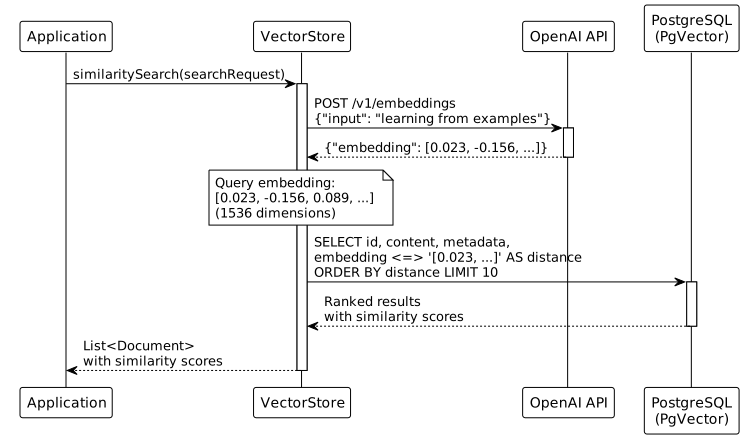
When you call vectorStore.similaritySearch(searchRequest):
-
Query Embedding Generation
POST https://api.openai.com/v1/embeddings { "model": "text-embedding-3-small", "input": "learning from examples" } Response: { "data": [{ "embedding": [0.023, -0.156, 0.089, ...] // 1536 numbers }] } -
Vector Similarity Query
SELECT id, content, metadata, embedding, (embedding <=> '[0.023, -0.156, ...]'::vector) AS distance FROM embeddings.vector_store ORDER BY distance ASC LIMIT 10; -
Result Ranking
Documents are returned sorted by similarity (smallest distance = most similar)
Complete Example: Wikipedia Article Search
Here’s how to build a complete article indexing and search system:
Step 1: Fetch and Store Articles
The complete flow for indexing documents:
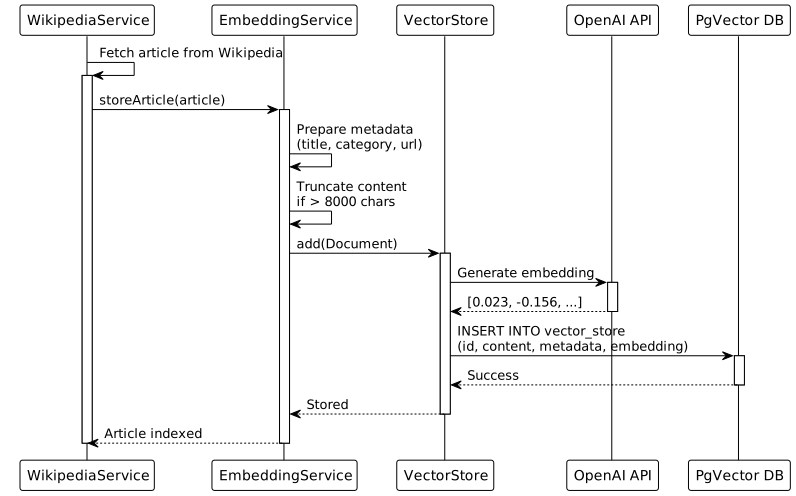
@Service
public class WikipediaService {

    private final EmbeddingService embeddingService;

    public void indexArticle(String title, String category) {
        // Fetch article from Wikipedia API
        String content = fetchFromWikipedia(title);

        // Create article object
        Article article = new Article();
        article.setId(UUID.randomUUID().toString());
        article.setTitle(title);
        article.setCategory(category);
        article.setContent(content);
        article.setUrl("https://en.wikipedia.org/wiki/" + title);
        article.setCreatedAt(LocalDateTime.now());

        // Store with embedding generation
        embeddingService.storeArticle(article);
    }

    public void loadAIArticles() {
        List<String> articles = List.of(
            "Machine learning",
            "Supervised learning",
            "Unsupervised learning",
            "Neural network",
            "Deep learning",
            "Computer vision",
            "Natural language processing"
        );

        articles.forEach(title -> {
            indexArticle(title, "AI");
            // Add delay to respect API rate limits
            Thread.sleep(500);
        });
    }
}
Step 2: Build Search API
@RestController
@RequestMapping("/api/search")
public class SearchController {

    private final EmbeddingService embeddingService;

    @GetMapping
    public SearchResult search(
            @RequestParam String q,
            @RequestParam(defaultValue = "10") int limit) {

        return embeddingService.semanticSearch(q, limit);
    }

    @GetMapping("/similar/{articleId}")
    public List<Article> findSimilar(
            @PathVariable String articleId,
            @RequestParam(defaultValue = "5") int limit) {

        return embeddingService.findSimilar(articleId, limit);
    }

    @GetMapping("/recommend")
    public List<Article> recommend(
            @RequestParam String q,
            @RequestParam(defaultValue = "5") int limit) {

        return embeddingService.getRecommendations(q, limit);
    }
}
Step 3: Test the System
# Index articles
curl -X POST http://localhost:8080/api/data/load

# Semantic search examples
curl "http://localhost:8080/api/search?q=learning+from+examples&limit=5"
# Returns: Supervised Learning (0.89), Machine Learning (0.76), ...

curl "http://localhost:8080/api/search?q=understanding+images"
# Returns: Computer Vision (0.91), CNN (0.85), ...

curl "http://localhost:8080/api/search?q=text+understanding"
# Returns: NLP (0.93), Transformers (0.87), ...

# Find similar articles
curl "http://localhost:8080/api/search/similar/abc-123?limit=5"
Retrieval-Augmented Generation (RAG)
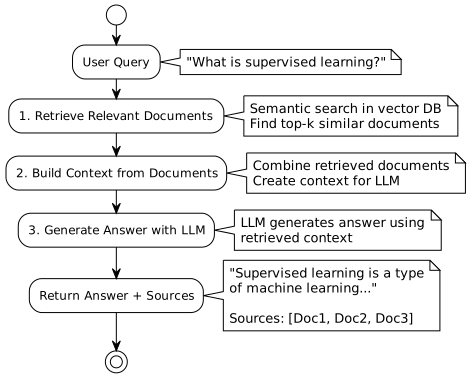
What is RAG?
Retrieval-Augmented Generation combines the power of semantic search with large language models to create accurate, context-aware question-answering systems.
Why RAG is Powerful
-
Grounded answers: Based on your specific documents, not just general knowledge
-
Up-to-date information: Works with your latest data
-
Source citations: Provides transparency and verifiability
-
Reduced hallucinations: LLM constrained to provided context
-
Domain-specific: Answers tailored to your knowledge base
Implementing RAG with Spring AI
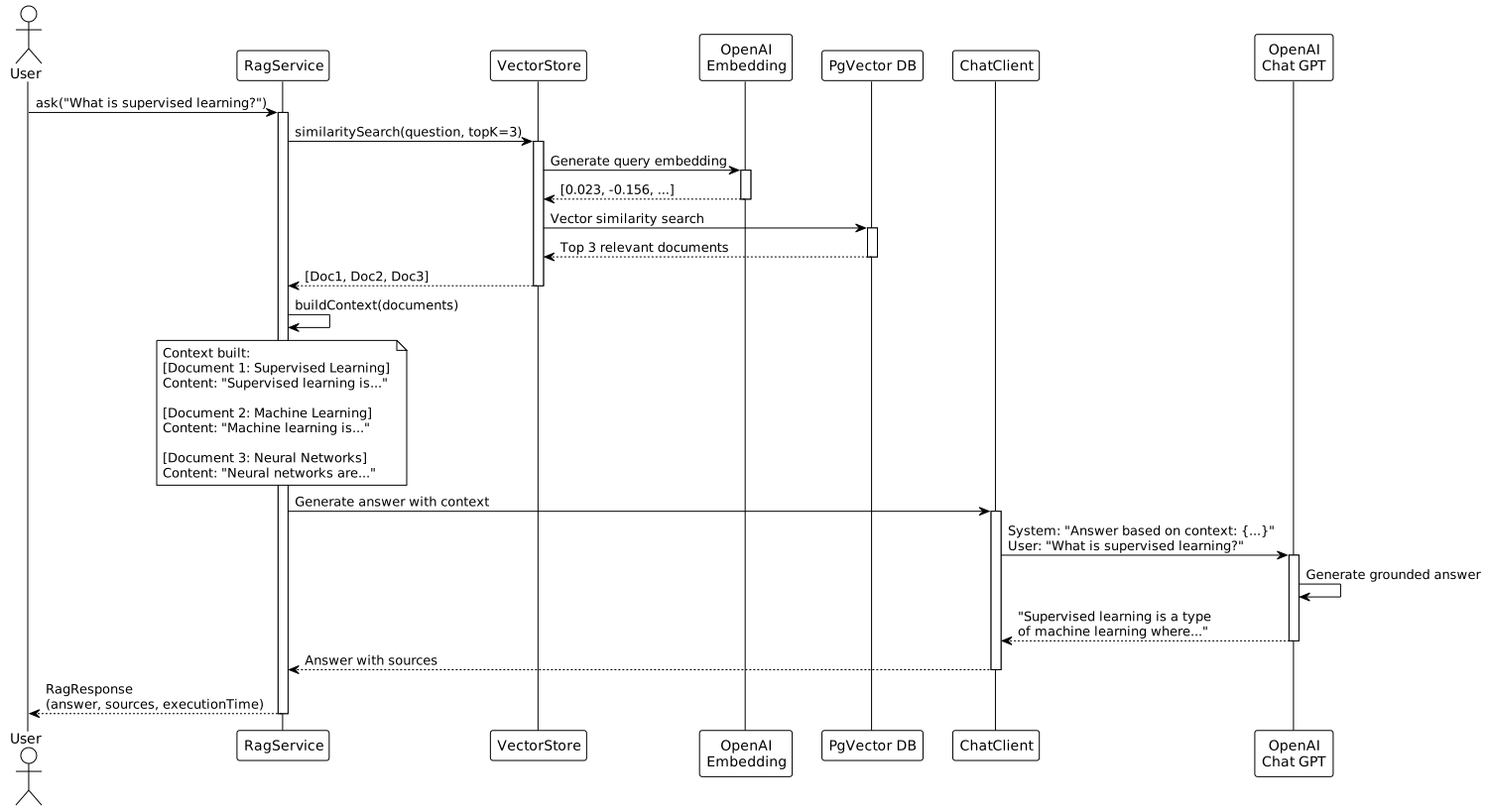
RagService Implementation
@Service
public class RagService {

    private static final Logger logger = LoggerFactory.getLogger(RagService.class);

    private final VectorStore vectorStore;
    private final ChatClient chatClient;

    private static final String SYSTEM_PROMPT_TEMPLATE = """
        You are a helpful AI assistant that answers questions based on the provided context.
        Use the following pieces of context to answer the user's question.
        If you cannot find the answer in the context, say so - do not make up information.

        Context:
        {context}

        Instructions:
        - Answer based only on the provided context
        - Be concise and accurate
        - If the context doesn't contain relevant information, say
          "I don't have enough information to answer that question."
        - Cite which documents you used if relevant
        """;

    public RagService(VectorStore vectorStore, ChatClient.Builder chatClientBuilder) {
        this.vectorStore = vectorStore;
        this.chatClient = chatClientBuilder.build();
    }

    /**
     * Ask a question using RAG
     * Returns an answer generated from retrieved documents
     */
    public RagResponse ask(String question, int topK) {
        long startTime = System.currentTimeMillis();

        logger.info("RAG request: '{}'", question);

        // Step 1: Retrieve relevant documents using semantic search
        SearchRequest searchRequest = SearchRequest.builder()
            .query(question)
            .topK(topK)
            .build();

        List<Document> relevantDocs = vectorStore.similaritySearch(searchRequest);

        if (relevantDocs.isEmpty()) {
            return new RagResponse(
                question,
                "I don't have any relevant documents to answer your question.",
                List.of(),
                0,
                System.currentTimeMillis() - startTime
            );
        }

        // Step 2: Build context from retrieved documents
        String context = buildContext(relevantDocs);

        logger.debug("Retrieved {} documents, context length: {}",
                    relevantDocs.size(), context.length());

        // Step 3: Generate answer using chat model with context
        SystemPromptTemplate systemPromptTemplate =
            new SystemPromptTemplate(SYSTEM_PROMPT_TEMPLATE);
        Message systemMessage = systemPromptTemplate.createMessage(
            Map.of("context", context)
        );
        UserMessage userMessage = new UserMessage(question);

        Prompt prompt = new Prompt(List.of(systemMessage, userMessage));

        // Call LLM
        long generationStart = System.currentTimeMillis();
        String answer = chatClient.prompt(prompt).call().content();
        long generationTime = System.currentTimeMillis() - generationStart;

        long totalTime = System.currentTimeMillis() - startTime;

        logger.info("RAG completed in {}ms (retrieval: {}ms, generation: {}ms)",
                   totalTime, generationStart - startTime, generationTime);

        // Extract source references
        List<DocumentReference> sources = relevantDocs.stream()
            .map(doc -> new DocumentReference(
                (String) doc.getMetadata().get("title"),
                (String) doc.getMetadata().get("category"),
                doc.getId()
            ))
            .collect(Collectors.toList());

        return new RagResponse(question, answer, sources, relevantDocs.size(), totalTime);
    }

    /**
     * Ask a question with category filtering
     * Example: Only search in "AI" category documents
     */
    public RagResponse askWithFilter(String question, String category, int topK) {
        SearchRequest.Builder builder = SearchRequest.builder()
            .query(question)
            .topK(topK);

        if (category != null && !category.trim().isEmpty()) {
            String filter = String.format("category == '%s'", category);
            builder.filterExpression(filter);
        }

        SearchRequest searchRequest = builder.build();
        List<Document> relevantDocs = vectorStore.similaritySearch(searchRequest);

        // Generate answer same as above...
        String context = buildContext(relevantDocs);

        SystemPromptTemplate systemPromptTemplate =
            new SystemPromptTemplate(SYSTEM_PROMPT_TEMPLATE);
        Message systemMessage = systemPromptTemplate.createMessage(
            Map.of("context", context)
        );
        UserMessage userMessage = new UserMessage(question);
        Prompt prompt = new Prompt(List.of(systemMessage, userMessage));

        String answer = chatClient.prompt(prompt).call().content();

        List<DocumentReference> sources = relevantDocs.stream()
            .map(doc -> new DocumentReference(
                (String) doc.getMetadata().get("title"),
                (String) doc.getMetadata().get("category"),
                doc.getId()
            ))
            .collect(Collectors.toList());

        return new RagResponse(question, answer, sources,
                             relevantDocs.size(), 0);
    }

    /**
     * Build context string from multiple documents
     * Formats documents for LLM consumption
     */
    private String buildContext(List<Document> documents) {
        StringBuilder context = new StringBuilder();

        for (int i = 0; i < documents.size(); i++) {
            Document doc = documents.get(i);
            String title = (String) doc.getMetadata().getOrDefault("title", "Untitled");
            String content = doc.getText();

            // Limit content length to avoid token limits
            if (content.length() > 1500) {
                content = content.substring(0, 1500) + "...";
            }

            context.append(String.format("\n[Document %d: %s]\n%s\n",
                                       i + 1, title, content));
        }

        return context.toString();
    }

    // Response classes
    public record RagResponse(
        String question,
        String answer,
        List<DocumentReference> sources,
        int documentCount,
        long executionTimeMs
    ) {}

    public record DocumentReference(
        String title,
        String category,
        String id
    ) {}
}
RAG API Endpoints
@RestController
@RequestMapping("/api/rag")
public class RagController {

    private final RagService ragService;

    @PostMapping("/ask")
    public RagResponse ask(@RequestBody RagRequest request) {
        return ragService.ask(request.question(), request.topK());
    }

    @PostMapping("/ask/filtered")
    public RagResponse askFiltered(@RequestBody FilteredRagRequest request) {
        return ragService.askWithFilter(
            request.question(),
            request.category(),
            request.topK()
        );
    }

    record RagRequest(String question, int topK) {}
    record FilteredRagRequest(String question, String category, int topK) {}
}
Testing RAG
# Ask a question
curl -X POST http://localhost:8080/api/rag/ask \
  -H "Content-Type: application/json" \
  -d '{
    "question": "What is supervised learning and how does it work?",
    "topK": 3
  }'

# Response
{
  "question": "What is supervised learning and how does it work?",
  "answer": "Supervised learning is a type of machine learning where the algorithm learns from labeled training data. The algorithm is provided with input-output pairs, and it learns to map inputs to the correct outputs. During training, the model makes predictions and receives feedback through labeled examples, allowing it to adjust and improve its accuracy over time. Common applications include image classification, spam detection, and sentiment analysis.",
  "sources": [
    {"title": "Supervised learning", "category": "ML", "id": "abc-123"},
    {"title": "Machine learning", "category": "AI", "id": "def-456"},
    {"title": "Neural network", "category": "ML", "id": "ghi-789"}
  ],
  "documentCount": 3,
  "executionTimeMs": 1247
}
RAG Recommendations
-
Chunk size matters: 500-1500 characters per document works well
-
Retrieve enough context: 3-5 documents usually sufficient
-
Filter by metadata: Use categories/tags to improve relevance
-
Monitor token usage: LLM context windows have limits
-
Add timestamps: Prioritize recent documents when relevant
-
Implement caching: Cache frequent queries to reduce cost
-
Provide source citations: Always show which documents were used
-
Handle no-results gracefully: Tell users when information isn’t available
Performance Optimization
Storage Requirements
Per document storage:
  Embedding: 1536 dimensions × 4 bytes = 6 KB
  Metadata:  ~1 KB
  Total:     ~7 KB per document

Dataset sizes:
  1,000 documents     = ~7 MB
  10,000 documents    = ~70 MB
  100,000 documents   = ~700 MB
  1,000,000 documents = ~7 GB
Query Performance
Typical query breakdown:
  1. Embedding generation (OpenAI):  50-200ms
  2. Vector search (PgVector):       5-50ms
  3. Result processing:              1-5ms
     ─────────────────────────────────────
     Total:                          ~60-255ms

RAG query breakdown:
  1. Embedding generation:           50-200ms
  2. Vector search:                  5-50ms
  3. LLM generation (GPT-3.5):      500-2000ms
     ─────────────────────────────────────
     Total:                          ~555-2250ms
Cost Analysis
Optimization Strategies
-
Use HNSW indexing: Essential for datasets > 1,000 documents
-
Batch operations: Store multiple documents in one transaction
-
Cache embeddings: Don’t regenerate for unchanged content
-
Limit context length: Truncate documents to ~1,500 chars
-
Use filters: Narrow search space with metadata filters
-
Connection pooling: Configure adequate connection pool size
-
Choose right embedding model: Balance cost vs. accuracy
# PostgreSQL optimization
spring.datasource.hikari.maximum-pool-size=10
spring.datasource.hikari.minimum-idle=5

# Vector store optimization
spring.ai.vectorstore.pgvector.index-type=HNSW
spring.ai.vectorstore.pgvector.distance-type=COSINE_DISTANCE

# HNSW parameters (tune for your use case)
# m: number of connections per element (higher = better recall, more memory)
# ef_construction: size of dynamic candidate list (higher = better index quality, slower build)
Alternative: Using Ollama for Local Embeddings
For privacy-sensitive applications or offline use, Ollama provides local embedding models:
Setup Ollama
# Install Ollama (see https://ollama.com)

# Pull embedding model
ollama pull nomic-embed-text

# Verify it's running
ollama list
Spring AI Configuration for Ollama
# application-ollama.properties
spring.profiles.active=ollama

# Ollama configuration
spring.ai.ollama.base-url=http://localhost:11434
spring.ai.ollama.embedding.options.model=nomic-embed-text

# Disable OpenAI auto-configuration
spring.autoconfigure.exclude=\
  org.springframework.ai.autoconfigure.openai.OpenAiAutoConfiguration
Ollama vs OpenAI Comparison
| Aspect | OpenAI | Ollama |
|---|---|---|
Cost |
$0.02 per 1M tokens |
Free (local) |
Quality |
Excellent (1536 dims) |
Good (768 dims) |
Speed |
50-200ms per request |
10-100ms per request |
Privacy |
Data sent to OpenAI |
Fully local |
Setup |
API key required |
Local installation needed |
Use Case |
Production, high quality |
Privacy, offline, development |
Common Patterns and Examples
Pattern 1: Document Chunking
For large documents, split into smaller chunks:
public List<Document> chunkDocument(String content, String title, int chunkSize) {
    List<Document> chunks = new ArrayList<>();

    for (int i = 0; i < content.length(); i += chunkSize) {
        int end = Math.min(i + chunkSize, content.length());
        String chunk = content.substring(i, end);

        Map<String, Object> metadata = new HashMap<>();
        metadata.put("title", title);
        metadata.put("chunkIndex", i / chunkSize);
        metadata.put("totalChunks", (content.length() + chunkSize - 1) / chunkSize);

        chunks.add(new Document(UUID.randomUUID().toString(), chunk, metadata));
    }

    return chunks;
}
Pattern 2: Metadata Filtering
Combine semantic search with structured filters:
public List<Article> searchByCategory(String query, String category, int limit) {
    SearchRequest request = SearchRequest.builder()
        .query(query)
        .topK(limit)
        .filterExpression(String.format("category == '%s'", category))
        .build();

    return vectorStore.similaritySearch(request).stream()
        .map(this::documentToArticle)
        .collect(Collectors.toList());
}

public List<Article> searchRecent(String query, LocalDateTime after, int limit) {
    SearchRequest request = SearchRequest.builder()
        .query(query)
        .topK(limit)
        .filterExpression(String.format("createdAt > '%s'", after))
        .build();

    return vectorStore.similaritySearch(request).stream()
        .map(this::documentToArticle)
        .collect(Collectors.toList());
}
Pattern 3: Hybrid Search
Combine keyword and semantic search:
public List<Article> hybridSearch(String query, int limit) {
    // Semantic search results
    List<Article> semanticResults = embeddingService.semanticSearch(query, limit)
        .getResults();

    // Traditional keyword search (using JPA)
    List<Article> keywordResults = articleRepository
        .findByTitleContainingOrContentContaining(query, query,
                                                 PageRequest.of(0, limit))
        .getContent();

    // Merge and re-rank
    return mergeAndRank(semanticResults, keywordResults, limit);
}

private List<Article> mergeAndRank(List<Article> semantic,
                                   List<Article> keyword,
                                   int limit) {
    // Combine with weighted scoring
    Map<String, Double> scoreMap = new HashMap<>();

    // Weight semantic search results higher
    semantic.forEach(a -> scoreMap.put(a.getId(), a.getScore() * 0.7));

    // Add keyword match boost
    keyword.forEach(a -> scoreMap.merge(a.getId(), 0.3, Double::sum));

    return scoreMap.entrySet().stream()
        .sorted(Map.Entry.<String, Double>comparingByValue().reversed())
        .limit(limit)
        .map(entry -> findArticleById(entry.getKey()))
        .collect(Collectors.toList());
}
Pattern 4: Multi-Modal Search
Search across different document types:
@Service
public class FileProcessingService {

    private final EmbeddingService embeddingService;

    /**
     * Process PDF files and index their content
     */
    public void processPDF(MultipartFile file, String category) throws IOException {
        try (PDDocument document = PDDocument.load(file.getInputStream())) {
            PDFTextStripper stripper = new PDFTextStripper();
            String text = stripper.getText(document);

            Article article = new Article();
            article.setId(UUID.randomUUID().toString());
            article.setTitle(file.getOriginalFilename());
            article.setCategory(category);
            article.setContent(text);

            embeddingService.storeArticle(article);
        }
    }

    /**
     * Process Markdown files
     */
    public void processMarkdown(MultipartFile file, String category) throws IOException {
        String markdown = new String(file.getBytes(), StandardCharsets.UTF_8);

        // Convert markdown to plain text for better embeddings
        Parser parser = Parser.builder().build();
        Node document = parser.parse(markdown);
        HtmlRenderer renderer = HtmlRenderer.builder().build();
        String html = renderer.render(document);
        String text = Jsoup.parse(html).text();

        Article article = new Article();
        article.setId(UUID.randomUUID().toString());
        article.setTitle(file.getOriginalFilename());
        article.setCategory(category);
        article.setContent(text);

        embeddingService.storeArticle(article);
    }
}
Testing and Debugging
Unit Testing Embeddings
@SpringBootTest
class EmbeddingServiceTest {

    @Autowired
    private EmbeddingService embeddingService;

    @Test
    void testSemanticSearch() {
        // Store test article
        Article article = new Article();
        article.setId("test-1");
        article.setTitle("Test Article");
        article.setContent("This is about machine learning and AI");
        article.setCategory("Test");

        embeddingService.storeArticle(article);

        // Search with similar query
        SearchResult result = embeddingService.semanticSearch(
            "artificial intelligence", 1
        );

        assertThat(result.getResults()).hasSize(1);
        assertThat(result.getResults().get(0).getTitle())
            .isEqualTo("Test Article");
    }

    @Test
    void testSimilarityScoring() {
        // Create two articles
        Article article1 = createArticle("ML Basics", "Machine learning fundamentals");
        Article article2 = createArticle("Cooking", "How to bake a cake");

        embeddingService.storeArticle(article1);
        embeddingService.storeArticle(article2);

        // Search should rank ML article higher
        SearchResult result = embeddingService.semanticSearch(
            "deep learning", 2
        );

        assertThat(result.getResults().get(0).getTitle())
            .isEqualTo("ML Basics");
        assertThat(result.getResults().get(0).getScore())
            .isGreaterThan(0.5);
    }
}
Debugging Vector Search
-- Check stored embeddings
SELECT
    id,
    metadata->>'title' as title,
    metadata->>'category' as category,
    array_length(embedding, 1) as dimensions
FROM embeddings.vector_store
LIMIT 10;

-- Manual similarity search
SELECT
    metadata->>'title' as title,
    (embedding <=> (SELECT embedding FROM embeddings.vector_store
                    WHERE metadata->>'title' = 'Machine learning')) as distance
FROM embeddings.vector_store
WHERE metadata->>'title' != 'Machine learning'
ORDER BY distance
LIMIT 5;

-- Check index usage
EXPLAIN ANALYZE
SELECT metadata->>'title'
FROM embeddings.vector_store
ORDER BY embedding <=> '[0.1, 0.2, ...]'::vector
LIMIT 10;
Logging Configuration
# Enable debug logging
logging.level.com.example.demo.service.EmbeddingService=DEBUG
logging.level.com.example.demo.service.RagService=DEBUG
logging.level.org.springframework.ai=DEBUG

# Log SQL queries
logging.level.org.hibernate.SQL=DEBUG
logging.level.org.hibernate.type.descriptor.sql.BasicBinder=TRACE
Conclusion
You’ve learned how to build sophisticated AI-powered search and question-answering systems using embeddings, vector databases, and RAG. Here’s what we covered:
-
Embeddings transform text into semantic vectors
-
Vector databases enable fast similarity search at scale
-
Spring AI provides elegant abstractions for AI integration
-
PgVector extends PostgreSQL with vector capabilities
-
RAG combines retrieval and generation for grounded answers